Manage and expand your decks
Create, rename, transfer and grow decks from the menu beside the deck name.
Why use it
Keep your sets organised and take a complete deck to another project when you need it.
Do this
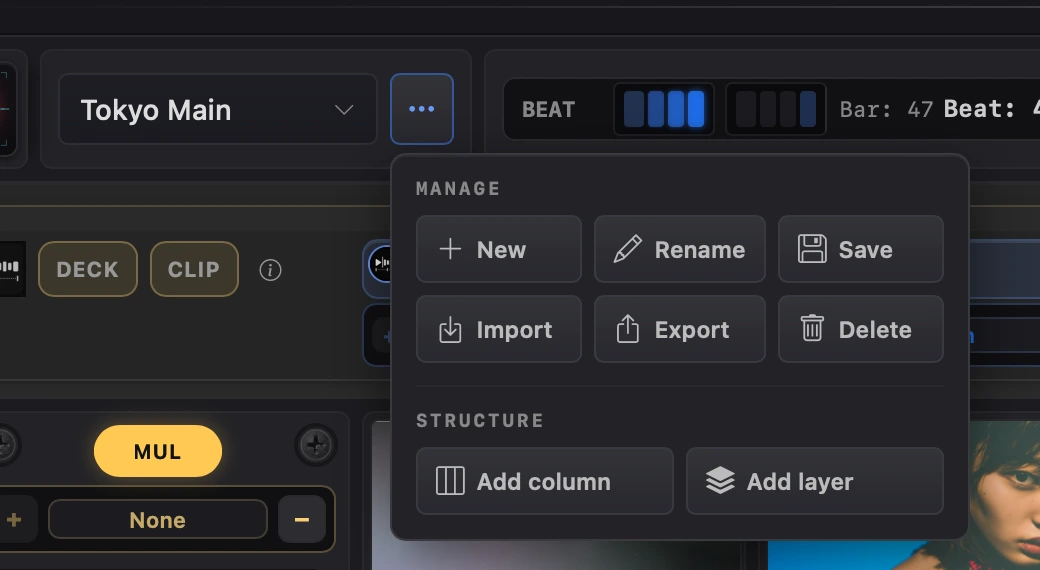
- 01Choose the ••• button beside the deck name. Manage works with whole decks; Structure changes the selected deck's grid.
- 02Choose New for a blank 3-layer, 8-stack deck. Rename changes the selected name; Save writes it and checks its clips and effects.
- 03Choose Export to package the selected deck and its files as a .splodeckpack. Import adds a deck pack and its files to the current project.
- 04Choose Delete to remove the selected deck. Export it first if you want to keep a portable copy.
- 05Choose Add column for another stack or Add layer for another visual on top. A deck can grow to 16 stacks and 12 layers.